


Enso HeartApp
Your heart, in your headphones.
Listen to the rhythm of your own heart, follow an expertly guided text, and gradually move into more bodily presence, calm and inner focus — anywhere, any time.
Free to start · iOS 16+ and Android · Wellness, not a medical device
ENStethoscope · connected
Listen to your heart01 · Free to start
Download. Connect. Listen.
Download Enso Heart, choose the first free guided text and listen to your heart's rhythm. Adjust the volume of your heart and of the guiding voice independently.
02 · Three ways to listen
How will you hear your heart?
Enso listening device
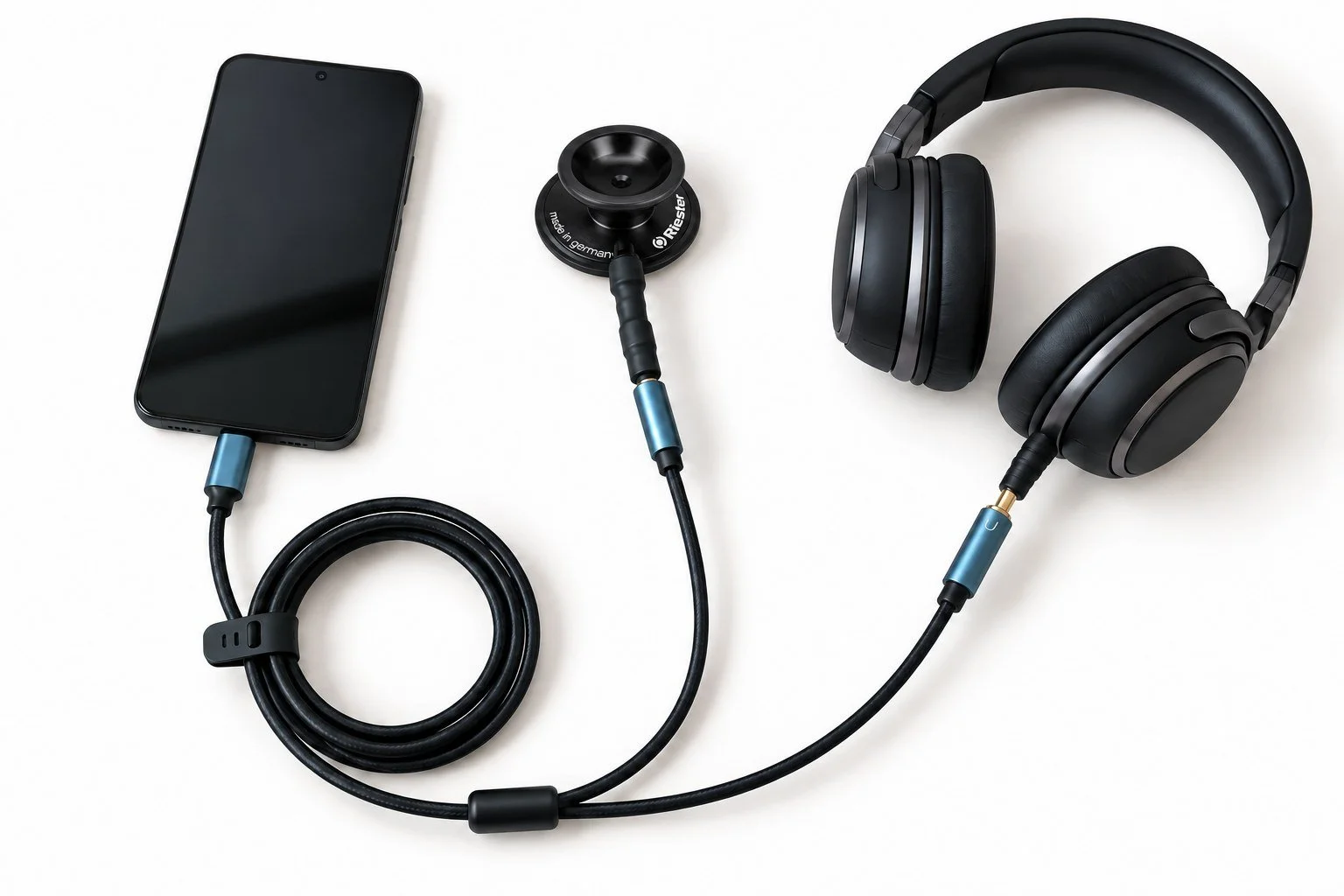
Picks up heart sounds directly from the chest and sends them in real time to the app and your headphones. The fullest, deepest Enso experience.
- Download the appDownload and open Enso Heart on your phone.
- Connect the stethoscope firstPlug the Enso stethoscope into your phone's USB-C port.
Heartbeat → Listen to your heart → USB Audio
- Then connect headphonesBluetooth or cable. If wireless headphones struggle, toggle Bluetooth off and on and reconnect.
- Find your heartbeatPlace the stethoscope gently on your chest over the heart and move slowly until the sound is clearest. Take your time.
- Choose a guided experienceFree to start: Shorter relaxation (≈10 min) and Longer relaxation (≈30 min). Press Play and balance heart and voice volume.
Meditations → choose a guided meditation → Play
03 · For the fullest experience
The Enso listening device.
A device with the head of a Riester medical stethoscope lets you hear your own heartbeat clearly and in real time. Connect it to your phone, put on headphones — the Enso Heart app joins the sound of your heart with guided audio, creating space to turn attention inward. Your heart becomes something you can hear and experience directly.
Enso Heart subscription
Order the listening device
€80 with an annual Enso Heart subscription, €160 without. Postage €4 — or pick up at Stegne 21, Ljubljana. Fill in the short order form and we confirm by email.
Enso HeartApp
Your heart, in your headphones.
Listen to the rhythm of your own heart, follow an expertly guided text, and gradually move into more bodily presence, calm and inner focus — anywhere, any time.
Free to start · iOS 16+ and Android · Wellness, not a medical device
EN{{srcShort}} · connected
Listen to your heart01 · Free to start
Download. Connect. Listen.
Download Enso Heart, choose the first free guided text and listen to your heart's rhythm. Adjust the volume of your heart and of the guiding voice independently.
02 · Three ways to listen
How will you hear your heart?
{{srcTitle}}
{{srcDesc}}
- {{st.t}}{{st.d}}
{{st.path}}
03 · For the fullest experience
The Enso listening device.
A device with the head of a Riester medical stethoscope lets you hear your own heartbeat clearly and in real time. Connect it to your phone, put on headphones — the Enso Heart app joins the sound of your heart with guided audio, creating space to turn attention inward. Your heart becomes something you can hear and experience directly.
Enso Heart subscription
Order the listening device
€80 with an annual Enso Heart subscription, €160 without. Postage €4 — or pick up at Stegne 21, Ljubljana. Fill in the short order form and we confirm by email.